UX Design · National Democratic Training Committee · 0→1 Product

Designing a Curriculum Experience from

the Ground Up

Stepping in as interim product designer, I designed the end-to-end information

architecture, user flows, navigation system, and page system for Campaign Co-

Pilot — NDTC's new curriculum program — from zero to a testable MVP.

Information Architecture

Interaction Design

Figma

Civic Tech

0→1 Product

Interim / Contract
The Challenge

Design a product when the product doesn't exist yet.

The National Democratic Training Committee was building Campaign Co-Pilot, a new structured

curriculum program to help political candidates and campaign staff develop the skills they need to run.

With their product designer on maternity leave, I stepped in as interim designer at a critical moment —

tasked with designing the entire experience from scratch before a single screen existed.

The National Democratic Training Committee was building Campaign Co-Pilot, a new structured curriculum program to help political candidates and campaign staff develop the skills they need to run. With their product designer on maternity leave, I stepped in as interim designer at a critical moment — tasked with designing the entire experience from scratch before a single screen existed.

The core challenge was compounded by ambiguity: the curriculum content itself was still being developed. That meant I couldn't design for a fixed set of pages — I had to design a flexible system that could accommodate whatever the curriculum team produced, at whatever scale. And I had to do all of this within the constraints of Docebo, NDTC's existing learning management platform.

The core challenge was compounded by ambiguity: the curriculum content itself was still being

developed. That meant I couldn't design for a fixed set of pages — I had to design a flexible system that

could accommodate whatever the curriculum team produced, at whatever scale. And I had to do all of

this within the constraints of Docebo, NDTC's existing learning management platform.

The constraint that shaped everything

Because the curriculum wasn't finalized, designing for scale wasn't optional — it was the entire strategy.

Every layout, flow, and page type needed to work for content that hadn't been written yet, inside a

platform with its own rules.

Because the curriculum wasn't finalized, designing for scale wasn't optional — it was the entire strategy. Every layout, flow, and page type needed to work for content that hadn't been written yet, inside a platform with its own rules.

My Role

My contributions

What I led and owned

Led discovery sessions with the curriculum team to extract program requirements and map the full

scope of the experience

Designed the complete information architecture — how Campaign Co-Pilot surfaces across the

marketing site, onboarding, and the Docebo learning dashboard

Created all user flows: discovery from the marketing site, onboarding (questionnaire + post-signup),

and in-program navigation

Designed a secondary program navigation menu that coexisted with Docebo's native navigation —

working within platform constraints to give users clear wayfinding inside the curriculum

Built a scalable page type system to accommodate varied curriculum formats — text-based

lessons, media-rich pages, and interactive worksheet inputs

Delivered a complete MVP in Figma ready for testing with real program participants

Information Architecture + Flows

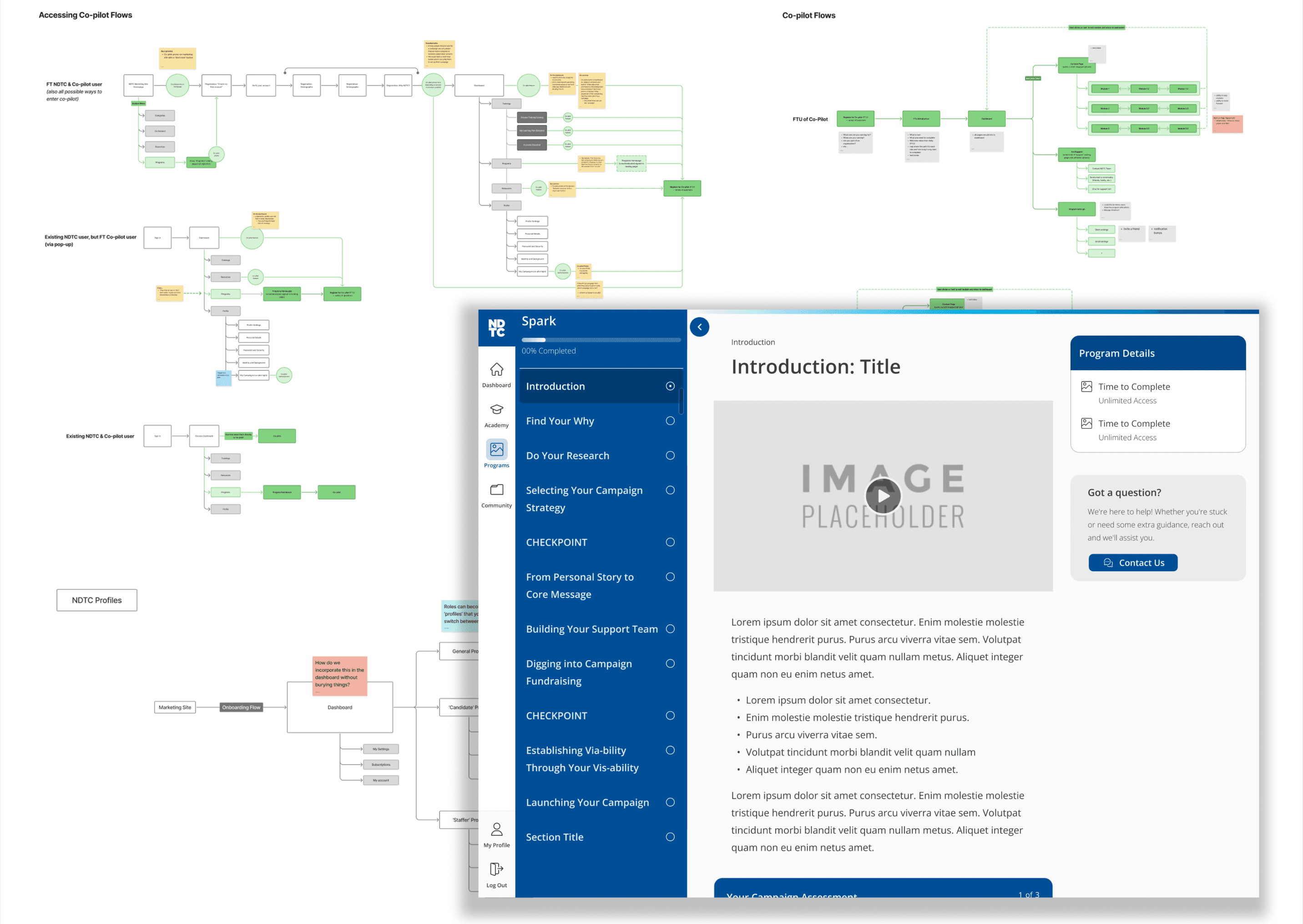
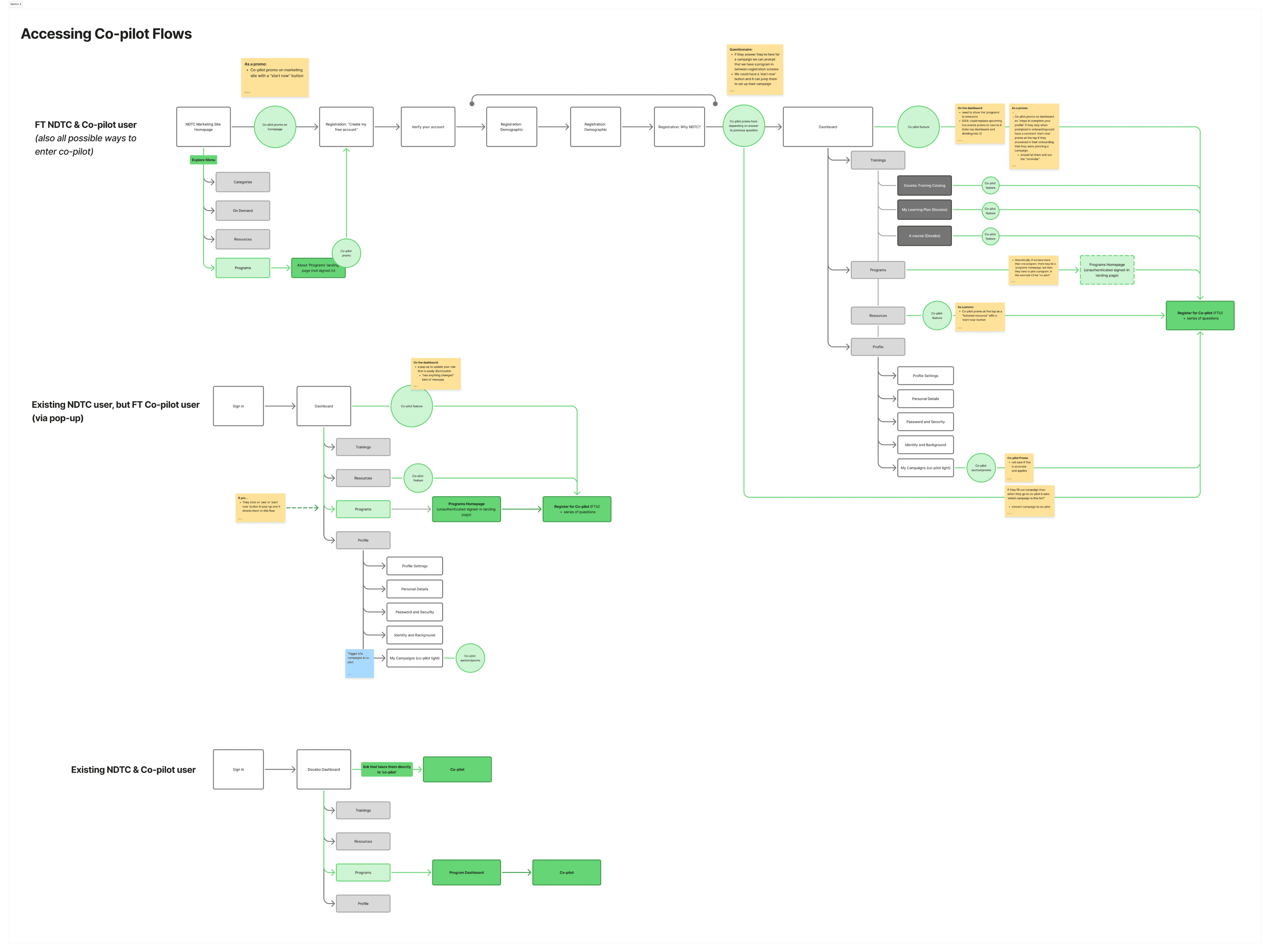
Mapping every way a user could find and enter the program

Before designing any screens, I mapped how users would discover, access, and move through

Campaign Co-Pilot from three distinct starting points. Each required its own flow and set of design

decisions.

Before designing any screens, I mapped how users would discover, access, and move through Campaign Co-Pilot from three distinct starting points. Each required its own flow and set of design decisions.

Flow 01

Discovery from the marketing site

Mapped how users would find Campaign Co-Pilot

through a full-width promotional placement, the Explore

menu under Programs, and the Programs homepage —

each with appropriate context and call to action

Mapped how users would find Campaign Co-Pilot

through a full-width promotional placement, the Explore menu under Programs, and the Programs homepage — each with appropriate context and call to action

Flow 02

Onboarding flow

Designed two onboarding touchpoints: surfacing

Campaign Co-Pilot during the sign-up questionnaire

and a post-signup modal — routing the right users into

the program at the right moment

Designed two onboarding touchpoints: surfacing

Campaign Co-Pilot during the sign-up questionnaire and a post-signup modal — routing the right users into the program at the right moment

Flow 03

Docebo dashboard access

Designed how enrolled users would see and return to

Campaign Co-Pilot inside the Docebo platform —

including enrollment status indicators and dedicated

navigation entry points

Designed how enrolled users would see and return to Campaign Co-Pilot inside the Docebo platform —

including enrollment status indicators and dedicated navigation entry points

Flow 04

In-program navigation

Designed how users move between lessons, track

progress, and understand where they are within the

curriculum at any given point

Key entry points designed across the marketing site and platform:

Full-width promotional banner

Dedicated Campaign Co-Pilot promo on the marketing site for high-visibility discovery

Explore menu → Programs

Persistent navigation access under the Explore menu, listed alongside other NDTC programs

Programs homepage + program detail page

Campaign Co-Pilot program page with related programs sidebar — similar to a course listing page

Sign-up questionnaire + post-signup modal

Two onboarding moments to route new users into Campaign Co-Pilot based on their goals and role

Docebo dashboard enrollment indicator

Surfaced enrollment status prominently within the learning platform so returning users could pick up where

they left off
Platform Constraints + Navigation Design

Building a second navigation layer inside someone else's platform

Because Campaign Co-Pilot lived inside Docebo — a third-party learning management system with its

own global navigation — designing the in-program menu required careful thinking about hierarchy,

coexistence, and platform constraints.

Because Campaign Co-Pilot lived inside Docebo — a third-party learning management system with its own global navigation — designing the in-program menu required careful thinking about hierarchy, coexistence, and platform constraints.

Docebo's native menu was already present for all platform-level navigation. The curriculum needed its own secondary menu to let users move through the program — between modules and lessons — without conflicting with or duplicating Docebo's. I had to design a program menu that felt purposeful and distinct, while working within what the platform would actually allow.

Docebo's native menu was already present for all platform-level navigation. The curriculum needed its

own secondary menu to let users move through the program — between modules and lessons —

without conflicting with or duplicating Docebo's. I had to design a program menu that felt purposeful

and distinct, while working within what the platform would actually allow.

The navigation design challenge

Docebo's existing menu

Platform-level navigation

Fixed — couldn't be removed or moved

Handled dashboard, account, and global settings

No awareness of program structure

The program menu I designed

Curriculum-level navigation

Sat alongside Docebo's menu without competing

Showed modules, lessons, and progress within the

program

Designed to scale as curriculum content was added
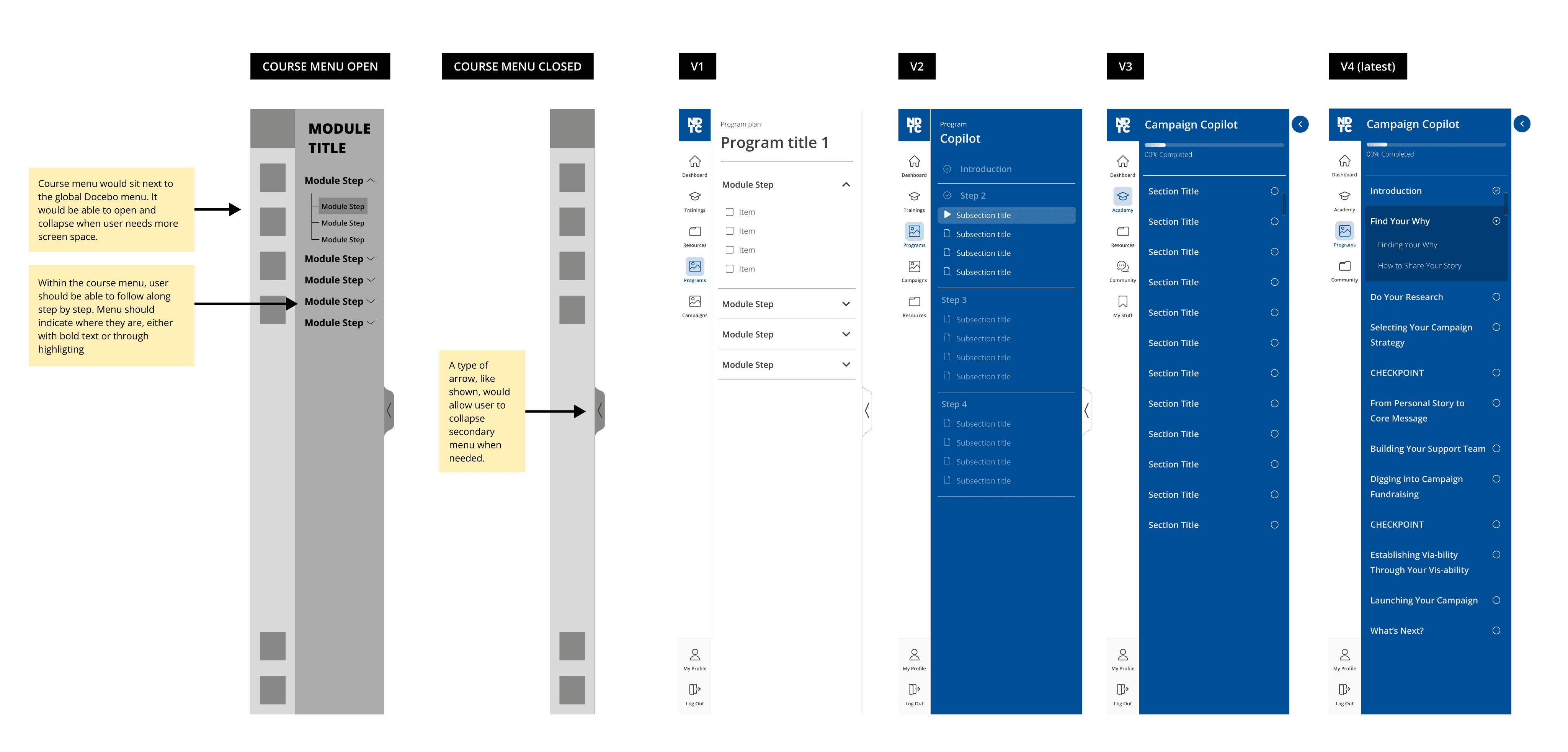
The solution was a secondary menu that scoped itself entirely to the program — giving users a clear

sense of where they were in the curriculum and what was coming next, while leaving Docebo's global

navigation to handle everything outside the program. Designing the visual and spatial relationship

between the two menus was a key part of ensuring the experience felt coherent rather than layered or

confusing.

The solution was a secondary menu that scoped itself entirely to the program — giving users a clear sense of where they were in the curriculum and what was coming next, while leaving Docebo's global navigation to handle everything outside the program. Designing the visual and spatial relationship between the two menus was a key part of ensuring the experience felt coherent rather than layered or

confusing.

Image above shows the evolution of the double menu — system menu with the secondary program menu.
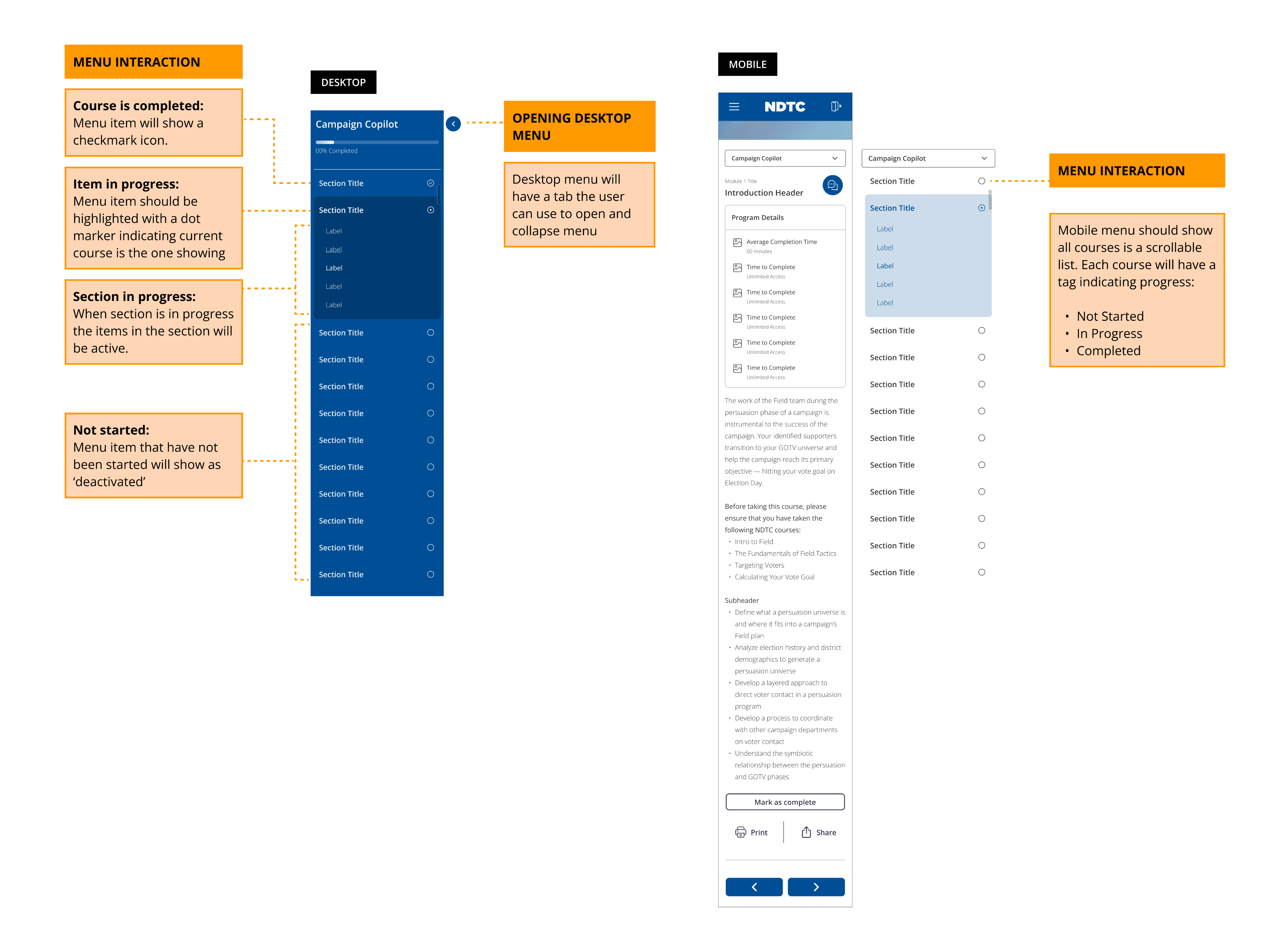
Image above shows what the interactions look like in desktop and mobile designs.

Page Type System

Designing for content that didn't exist yet
Because the curriculum was still in development, I designed a flexible page type system rather than

individual one-off screens. Each page type handles a specific kind of content need — and scales as

the curriculum team adds more material.

Because the curriculum was still in development, I designed a flexible page type system rather than individual one-off screens. Each page type handles a specific kind of content need — and scales as the curriculum team adds more material.

Text-based lesson

Standard reading and instructional content — structured for scannability and clear progress through longer lessons

Interactive worksheet

Pages with input fields for user-completed exercises — designed to feel like a working tool, not just a form

Module landing page

Introduces a curriculum section, sets context, and surfaces the lessons within that module

Media page

Layouts accommodating video, audio, or embedded media alongside supporting text and navigation

Program overview

Entry point into the curriculum —shows modules, progress, and what's coming next in the program

Flexible / hybrid layout

Built to accommodate future content types the curriculum team hadn't defined yet — designed for scale

Text-based lesson

Standard reading and instructional content — structured for scannability and clear progress through longer lessons

Media page

Layouts accommodating video, audio, or embedded media alongside supporting text and navigation

Interactive worksheet

Pages with input fields for user-completed exercises — designed to feel like a working tool, not just a form

Program overview

Entry point into the curriculum —shows modules, progress, and what's coming next in the program

Module landing page

Introduces a curriculum section, sets context, and surfaces the lessons within that module

Flexible / hybrid layout

Built to accommodate future content types the curriculum team hadn't defined yet — designed for scale

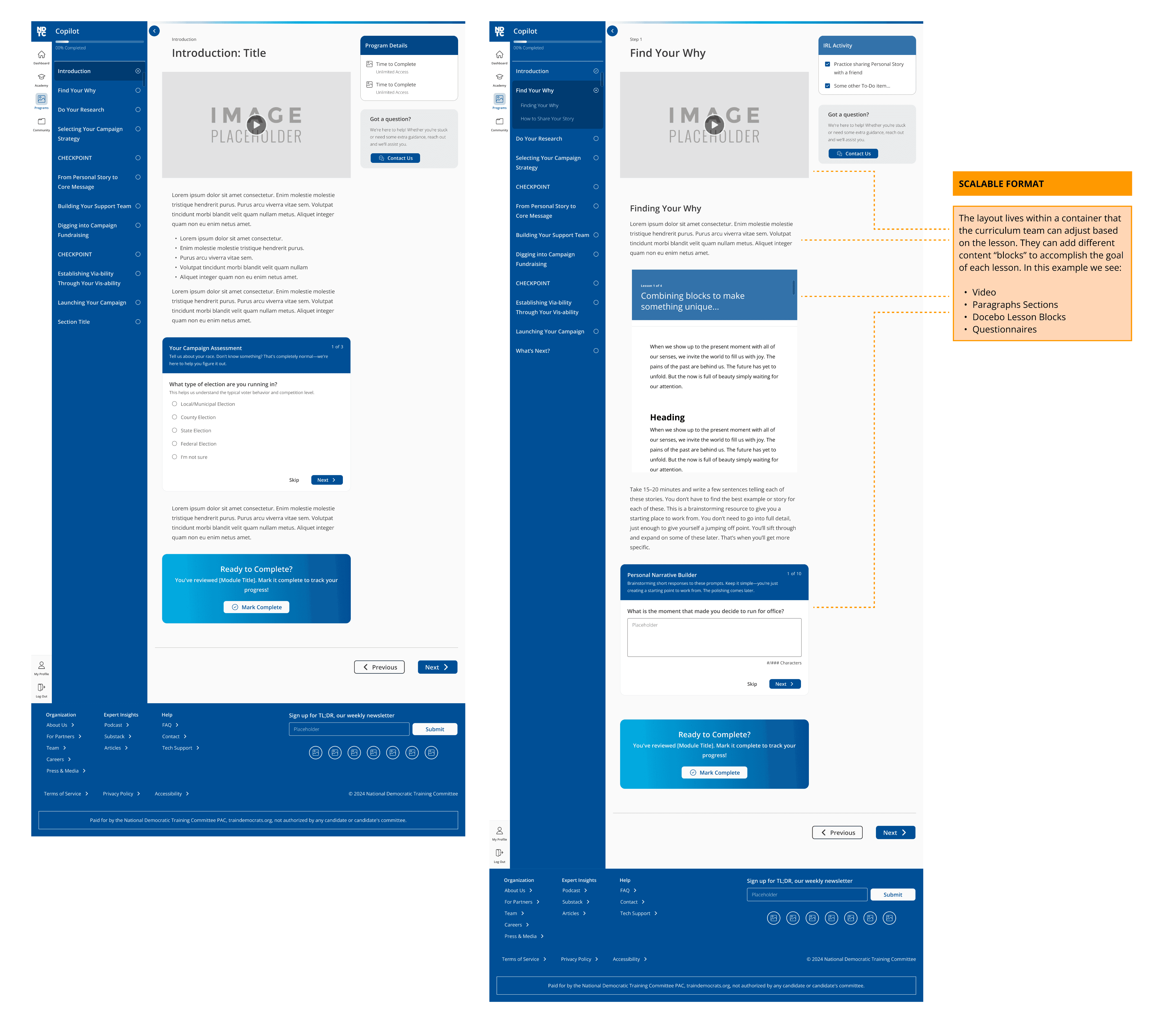
Image above shows examples of two pages using a variety of content blocks to create a curriculum page.

Outcome

Zero to testable MVP

Campaign Co-Pilot went from a set of open requirements and unanswered questions to a complete,

testable MVP in Figma. NDTC had everything they needed to begin testing the program experience with

real participants — a full navigation system, every user flow, and a page type library their curriculum

team could build against.

Campaign Co-Pilot went from a set of open requirements and unanswered questions to a complete, testable MVP in Figma. NDTC had everything they needed to begin testing the program experience with real participants — a full navigation system, every user flow, and a page type library their curriculum team could build against.

Complete flow coverage

Every user path — discovery,

onboarding, and in-program

navigation — fully designed and

documented

Every user path — discovery, onboarding, and in-program navigation — fully designed and documented

Scalable page system

A page type library the curriculum

team could apply to new content

without redesigning from scratch

A page type library the curriculum team could apply to new content without redesigning from scratch

MVP ready for testing

Delivered a complete prototype

NDTC could use to test Campaign

Co-Pilot with real program

participants

Delivered a complete prototype NDTC could use to test Campaign Co-Pilot with real program

participants

Methods + Tools

Information architecture

User flow mapping

Requirements gathering

Platform constraint design

Navigation design

Page type system design

Interaction design

Figma

Design for scale

Stakeholder interviews