UX Research + Product Design · Safer · Trust & Safety

Reducing Cognitive Load for Trust & Safety

Teams

Reducing Cognitive Load for Trust & Safety Teams

A research-led redesign of Safer's image review tool — streamlining how trust

and safety analysts triage queues of potentially exploitative content so they can

work faster, with less friction.

A research-led redesign of Safer's image review tool — streamlining how trust and safety analysts triage queues of potentially exploitative content so they can work faster, with less friction.

UX Research

Product Design

UX Debt Audit

Trust & Safety

B2B SaaS

Agile
The Challenge

Every extra click has a human cost.

Safer's API helps companies prevent the re-circulation of child exploitative images by matching

uploaded content against NCMEC's hash database. When the API is uncertain about an image, analysts

use Safer's Review Tool to manually triage, annotate, and report findings.

Safer's API helps companies prevent the re-circulation of child exploitative images by matching uploaded content against NCMEC's hash database. When the API is uncertain about an image, analysts use Safer's Review Tool to manually triage, annotate, and report findings.

But the tool wasn't keeping up with how analysts actually worked. Large queues of false positives — images flagged but not harmful — forced analysts to click through each one individually, on top of using their own internal review tools. The added friction created frustration, uncertainty, and unnecessary

cognitive burden for people doing already-demanding work.

But the tool wasn't keeping up with how analysts actually worked. Large queues of false positives —

images flagged but not harmful — forced analysts to click through each one individually, on top of using

their own internal review tools. The added friction created frustration, uncertainty, and unnecessary

cognitive burden for people doing already-demanding work.

My Role

My contributions

What I led and owned

Conducted a full UX debt audit of the existing Review Tool dashboard and workflows

Designed and ran 6 unmoderated user tests and surveys to identify workflow pain points

Synthesized research findings into 3 core insights that shaped the design direction

Designed the new grid dashboard view and ticket counter to enable faster queue triage

Redesigned individual tickets to surface the most critical information at a glance

Audited and redesigned icon set to improve clarity and follow established UX communication

principles

Improved ticket selection interaction to reduce ambiguity during bulk actions

Research

Understanding the workflow, not just the interface

UX debt audit

Mapped existing dashboard workflows to identify what

was technically possible and where friction already

existed in the product

Mapped existing dashboard workflows to identify what was technically possible and where friction already existed in the product

6 unmoderated user tests + surveys

Captured where pain points occurred in real workflows

and what users needed to feel efficient — without

moderator influence

Captured where pain points occurred in real workflows and what users needed to feel efficient — without moderator influence

Three insights emerged from the research that directly shaped the design:

Insight 01

Information needs shift by workflow phase

Users followed 5 general steps and needed different data at each stage. In triage, they needed to spot false

positives fast. In review mode, they needed to annotate and classify quickly to move toward reporting.

Users followed 5 general steps and needed different data at each stage. In triage, they needed to spot false positives fast. In review mode, they needed to annotate and classify quickly to move toward reporting.

Insight 02

Team size changes what information matters

Larger teams with escalation workflows wanted more content detail upfront. Smaller teams preferred minimal

information to make decisions faster and move on.

Larger teams with escalation workflows wanted more content detail upfront. Smaller teams preferred minimal information to make decisions faster and move on.

Insight 03

Fewer clicks = faster throughput
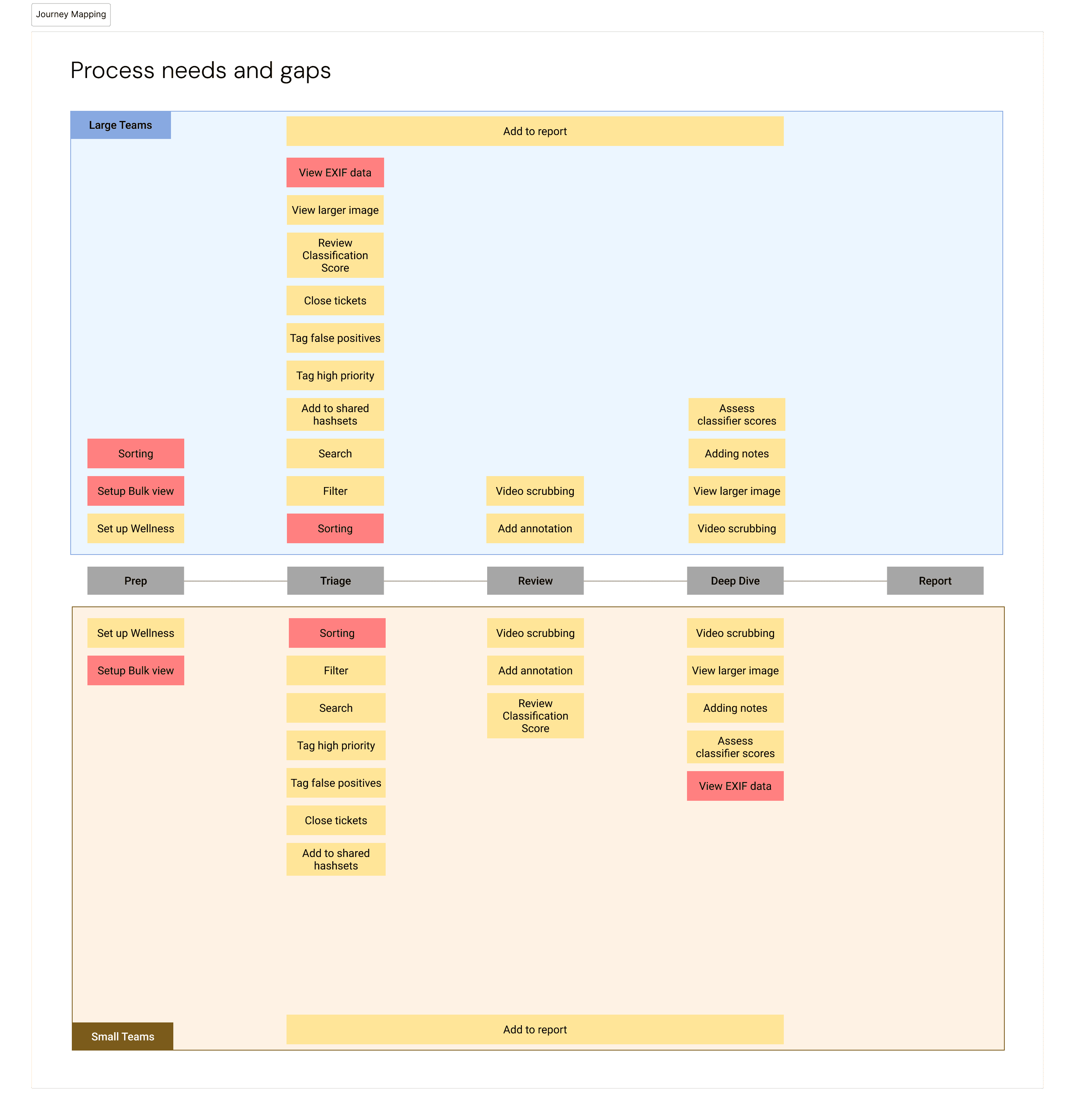
Users wanted everything in one place. Reducing clicks was directly tied to efficiency — getting through queues

faster, or ensuring flagged content was reported without delay.

Users wanted everything in one place. Reducing clicks was directly tied to efficiency — getting through queues faster, or ensuring flagged content was reported without delay.

Design

Before and after

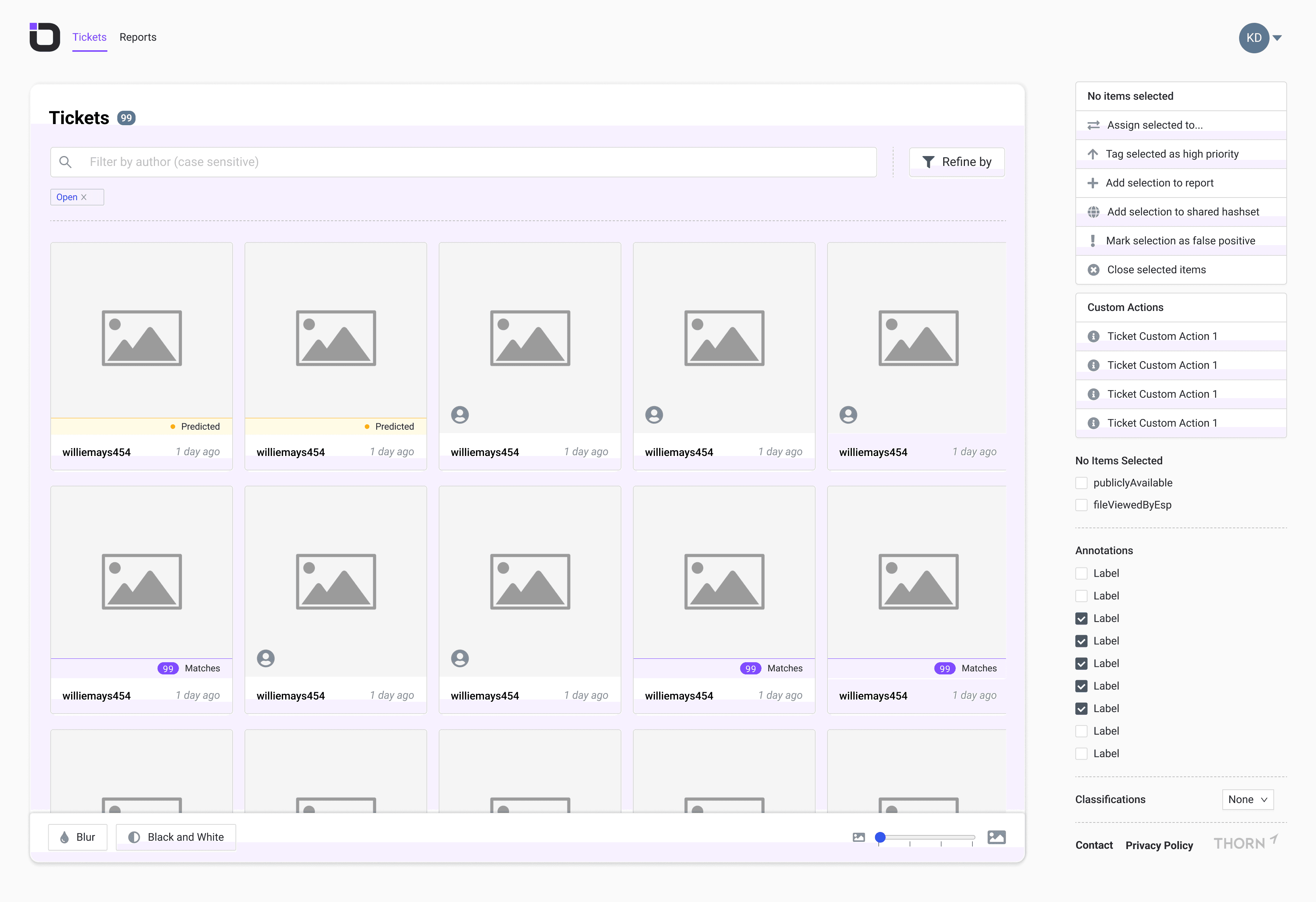
Staying agile, the team scoped the redesign to one focused problem: give users a faster way to scan

and clear false positives, reducing cognitive load so they could focus attention where it was actually

needed.

Staying agile, the team scoped the redesign to one focused problem: give users a faster way to scan and clear false positives, reducing cognitive load so they could focus attention where it was actually needed.

Before

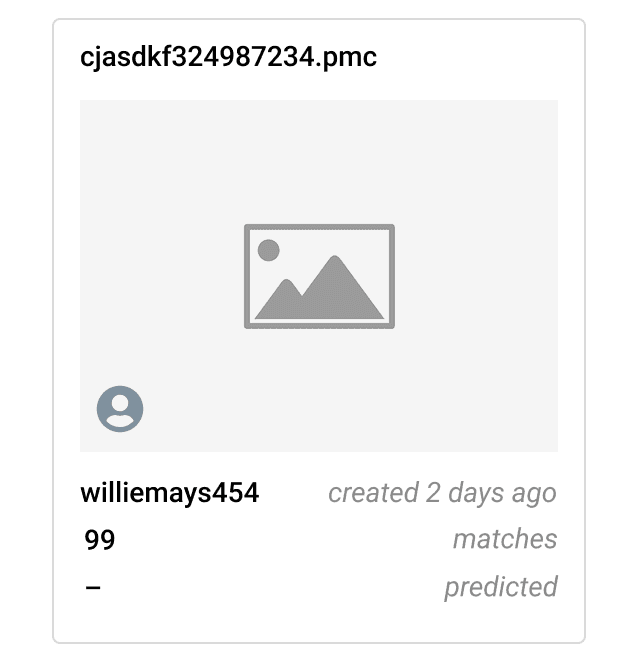
Single list view only. Users scrolled and selected tickets individually or via right-click. Relied on icons alone to identify match status, false positives, and ticket type.

After

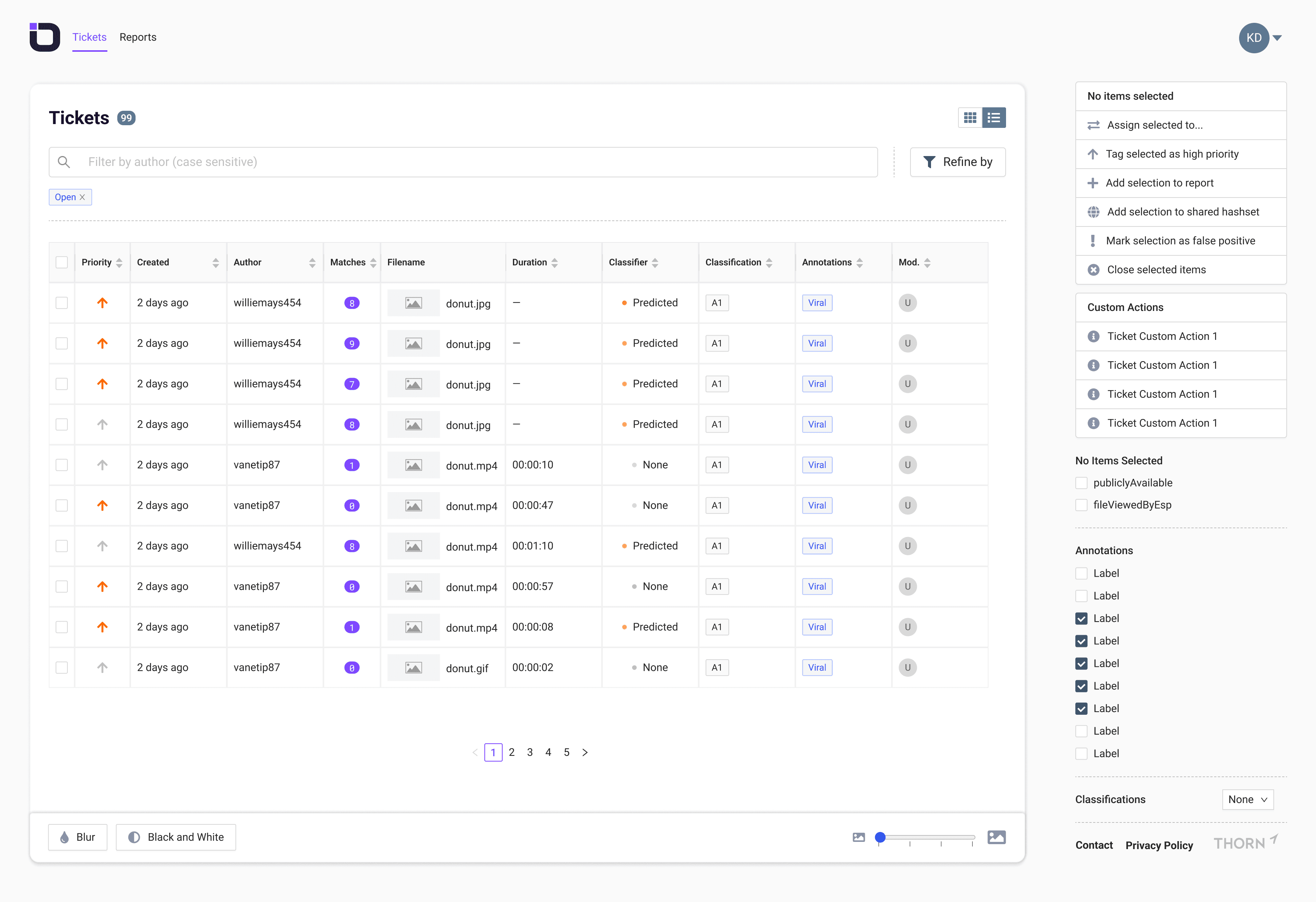
New list dashboard view added alongside the existing view. Ticket counter lets analysts see queue size at a glance. Bulk selection and clearing built directly into the triage flow.

Additional Improvements

Polishing the details

Beyond the core scope, the team addressed three pieces of long-standing UX debt that were

contributing to friction across the tool.

Beyond the core scope, the team addressed three pieces of long-standing UX debt that were contributing to friction across the tool.

Ticket redesign

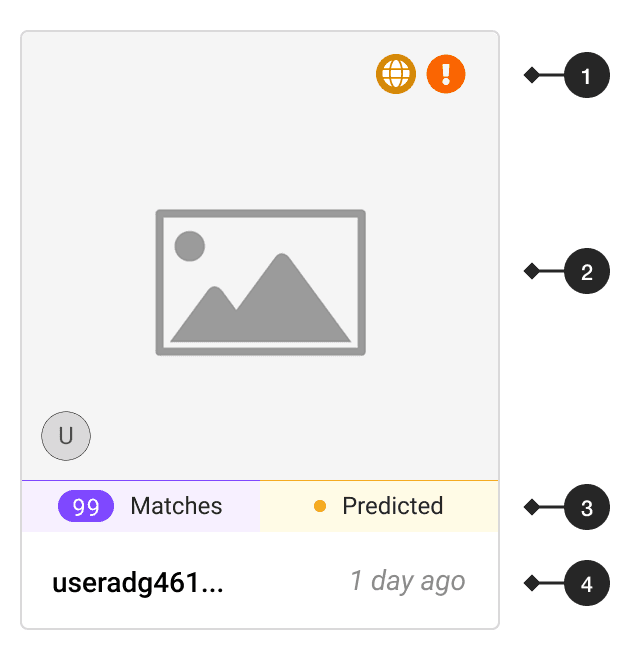
Restructured ticket layout to

surface critical info — matches,

status — at a glance using hot-

corner icon placement

Restructured ticket layout to surface critical info — matches, status — at a glance using hot-corner icon placement

Icon consistency

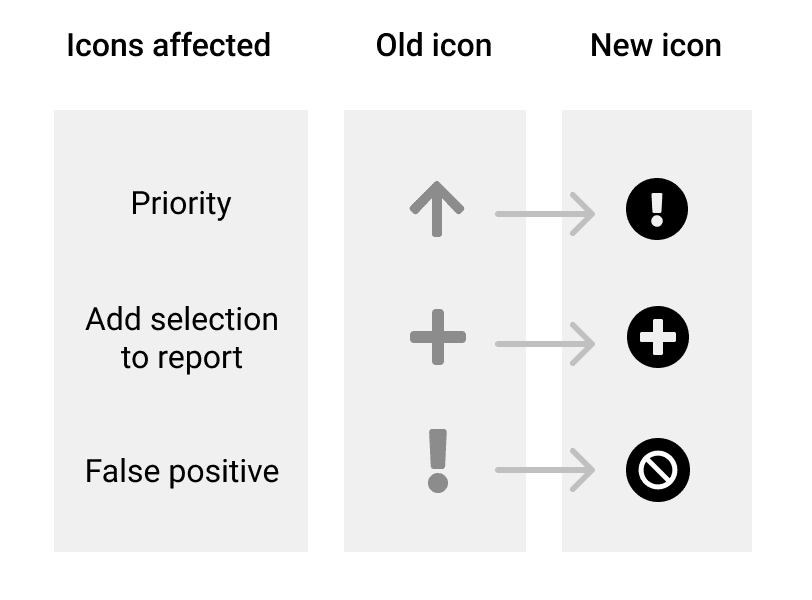
Audited and rebuilt the icon set to

improve action clarity and align

with established UX

communication principles

Audited and rebuilt the icon set to improve action clarity and align with established UX communication principles

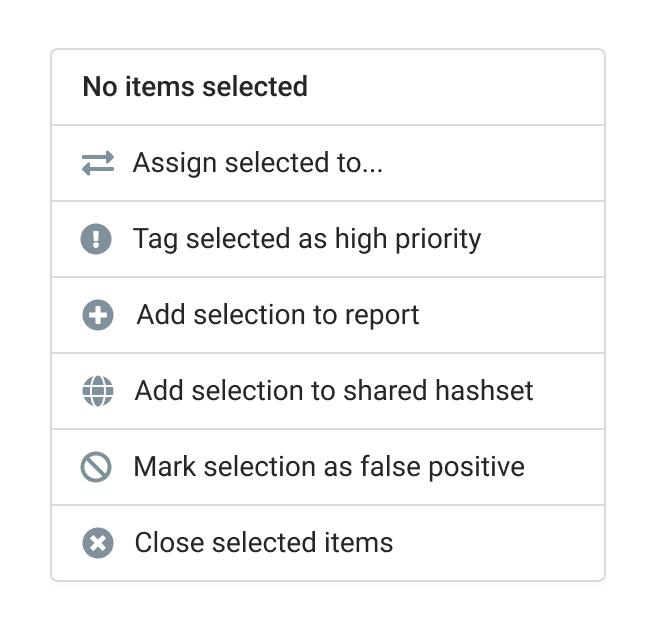
Selection state

Added a stronger visual indicator

for selected tickets — resolving

user confusion during bulk triage

actions

Added a stronger visual indicator for selected tickets — resolving user confusion during bulk triage actions

Before

Original Ticket Design

After

1 - Updated indicators

2 - Larger, full-bleed photo

3 - Matches/Predicted Called Out

4 - Author and content date placement

Before and After
After — in context
Impact

What changed for users

Faster triage

Grid view lets analysts scan and

bulk-clear false positives without

scrolling through individual tickets

Grid view lets analysts scan and bulk-clear false positives without scrolling through individual tickets

Reduced cognitive load

Clearing false positives quickly

freed mental energy for images

that required deeper, focused

review

Clearing false positives quickly freed mental energy for images that required deeper, focused review

Less workflow friction

Fewer clicks between Safer and

internal tools meant analysts could

maintain flow across their full

review process

Fewer clicks between Safer and internal tools meant analysts could maintain flow across their full review process

Methods + Tools

UX debt audit

Unmoderated user testing

Survey design

Research synthesis

Dashboard design

Interaction design

Icon design

Agile / iterative scoping